Giving AI a Body: A Practical Introduction to the Model Context Protocol
What happens when an AI can do more than just "think"? This practical guide explores the Model Context Protocol, a new standard that gives AI a "body" to act. See it in action as we have an AI build a website directly from a Figma design.
The Large language model (LLM) Gemini from Google and ChatGPT from OpenAI achieved a gold medal standard in this year's International Mathematical Olympiad, the most prestigious mathematical competition globally. If you are a software developer or work with computers generally, chances are you have experienced firsthand just how far Artificial Intelligence (AI) and LLMs have come. Each new iteration of a model is being fed with more up to date knowledge and receives upgrades in its reasoning capabilities allowing it to solve more complex and time-intensive tasks faster and with less uncertainty.
This rapid progress has led to many specialized AI tools, each having its own advantages:
- Web Interfaces such as claude.ai, gemini.google.com and chatgpt.com for powerful, conversational reasoning
- AI-Native IDEs like Cursor, Windsurf, Google Firebase studio or AWS Kiro that build the editor around the AI
- IDE Extensions like GitHub Copilot and Gemini Code Assist that live inside our favorite editors
- And Command-Line Agents like Claude Code and gemini-cli that bring AI directly into the terminal
Yet, this explosion of new ways to use different LLMs has created a fundamental problem. Each of the LLM applications mentioned above are driven by companies and their preexisting ecosystems with their own walled-off functionalities that they each want to push and connect to win the AI war. For example, the gemini web interface only connects natively to google services and the prominent developer platform GitHub as well as their admittedly very powerful google search via function calling. Additionally, Web Interfaces in general can only draw context from the prompts you send off. IDEs and IDE Extensions see open files in your IDE and the terminal draws its context from whatever you add or pipe to a command. Therefore, there are many ways to utilize different LLMs from different providers, each with their own contexts and unique set of tools. This problem of limitation to tools and how to access or use them based on what AI client you use is often referred to as “fragmented context”. Lucky for us, the creation of the Model Context Protocol tackles exactly this issue. It creates one commonly agreed way for all AI tools to connect to powerful new resources to draw context from. It also provides the AI with tools it can execute to perform tasks and act as an agent on our behalf.
Model Context Protocol: A Nervous System for Your AI
The Model Context Protocol (MCP) is an open source standard designed by Anthropic (Creators of Claude) to standardize how AI systems interact with external tools and resources. With a MCP Server, we can give our LLM access to tools to perform actions, resources to provide data and prompts to guide the AI’s reasoning. Often used is the analogy of the USB-C Port connecting different devices. I actually would describe it more as a fully operational nervous system with the LLM being the brain. On its own, however, it's a powerful thinker that lacks the ability to act. MCP Clients, like web interfaces or command line agents, are the nerve cells that carry commands to the brain. MCP Servers are the body providing it the opportunity to hear, see and touch things digitally. I am fully aware that this sounds like something from Cyberpunk 2077 and yet on a digital level it seems we are closer to this science fiction than you may think.
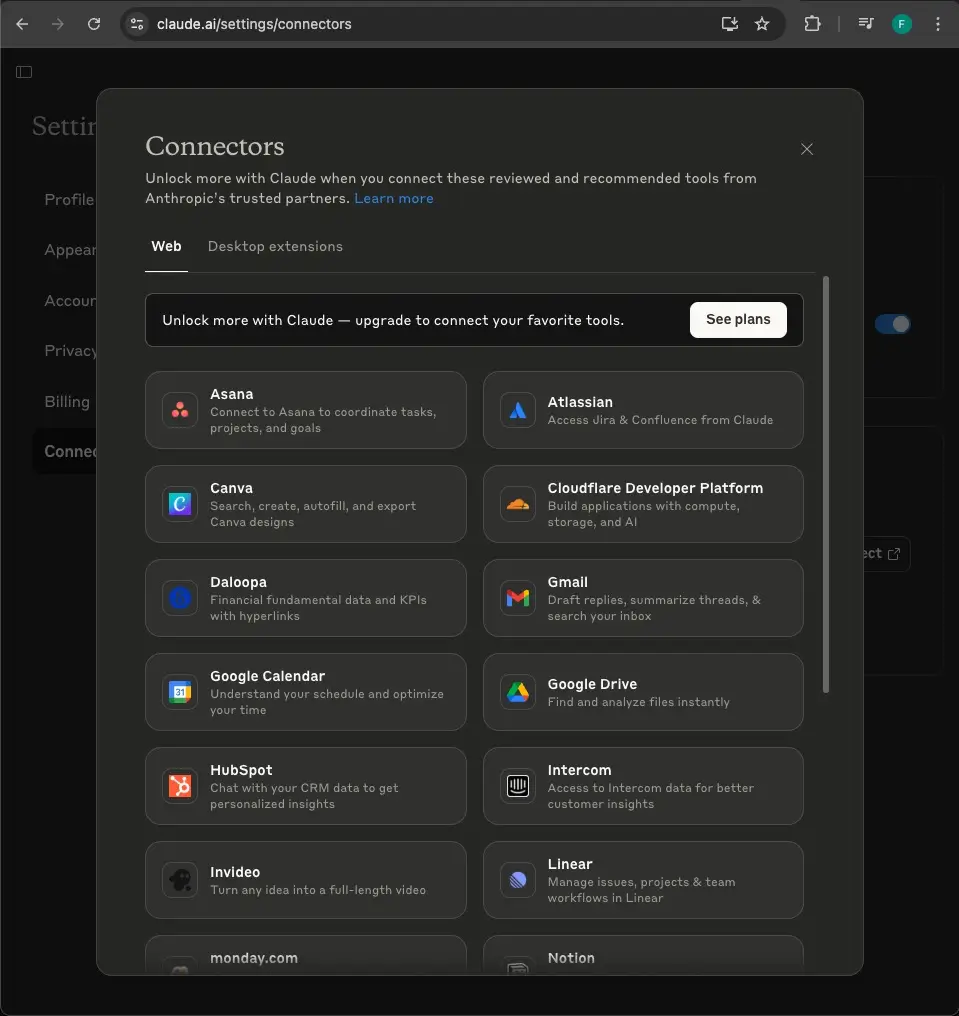 Take the Claude web Interface for example. You can connect it with Google Services, Atlassian Services and many others to read, create, edit and even remove items such as Atlassian documentations and Google emails. These services are provided out of the box. If you have the Pro subscription, you have the option to add other services, which Claude calls “connectors”. These work by providing a remote MCP server URL.
Although there is a way to connect the Gemini web Interface with MCP Servers via an unofficial third party chrome extension (be careful using this one), as of right now, Gemini’s web Interface does not offer the feature to connect to custom MCP Servers. Considering the fact that OpenAI just released this MCP Server connecting connectors to their chatGPT in early June, this might still be on Google's roadmap.
While the Gemini web interface has its limitations, the command-line offering is far more powerful. Similar to tools like Anthropic's Claude Code, Gemini offers a Command Line Interface (CLI) that runs locally in your terminal. This allows it to connect to any MCP Server, giving it the ability to control local processes like your browser if you allow it to.
Putting it all together: A Real-World Demo
With this setup, I can simply type gemini in my VSCode terminal to start an interactive session.
I gave it a task: build a website using Vue.js from a Figma design link. The process was a collaboration. I guided the AI at key moments, telling it to consult up-to-date documentation (via the context7 MCP Server). I also instructed it to run the development server in the background using pnpm run dev &, which allowed it to debug the live website at localhost:3000 with a Playwright browser (via the Playwright MCP Server).
The entire interactive session took about 26 minutes.
The beautiful initial design, created by Dennis Nzioki for the Figma Community: https://www.figma.com/files/team/947098978251703897/resources/community/file/1334878530282316387?fuid=947098973310943779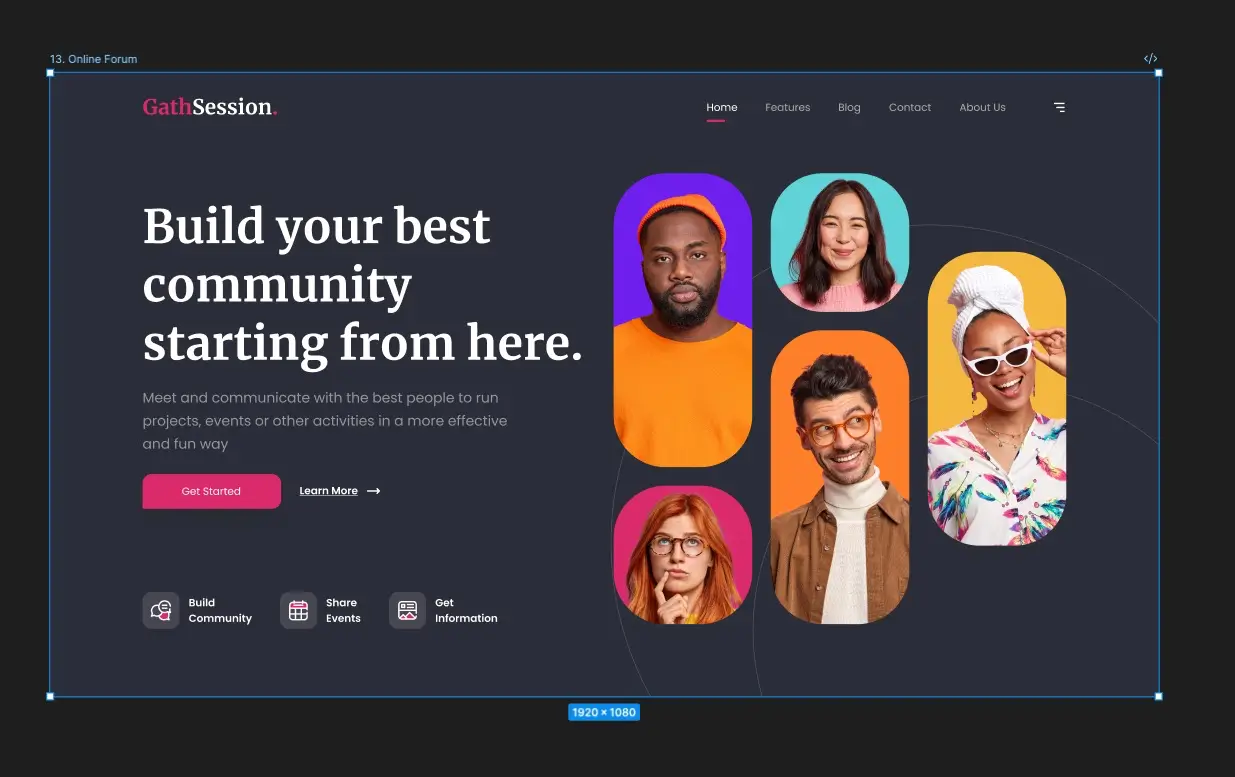
The result:
Interactive demo: https://scheppening.com/demos/giving-ai-a-body-a-practical-introduction-to-the-model-context-protocol/figma-mcp.html
You can see Gemini created an interactive scrollable website with hover effects for desktop. As a final step, I prompted it to add another section with scroll animations.
It's worth noting that this demo was built using gemini-cli version 0.1.21. The world of AI tools is moving incredibly fast, so both the client and the specific MCP Servers used here will likely be updated very quickly. There are so many more MCP Servers providing your LLM with more functionality including Model Enhancement MCP Servers that add to the cognitive abilities of the LLM itself like the sequential-thinking server. Looking at connecting our LLM with new MCP Servers and abilities, I find the quote “with great power comes great responsibility” appropriate and have to mention that you should make sure in the seamlessness of connecting to different services you only connect to MCP Servers you trust, as your input data goes through it. My recommendation is to only connect to MCP Servers provided by reputable companies or people you trust.
Many MCP Servers with their categories can be found in this list: https://github.com/punkpeye/awesome-mcp-servers
My setup
My complete latest and so far favorite LLM setup is running gemini-cli in the VSCode terminal. That way gemini-cli integrates itself quite nicely with code native diffing. https://developers.googleblog.com/en/gemini-cli-vs-code-native-diffing-context-aware-workflows/ . In combination with gemini-cli I use MCP Servers to connect to the following services:
- Bitbucket to get pull request information and create pull requests for me
- Atlassian to get confluence and jira ticket information
- Figma to get the layout information
- Context7 to get the most up to date documentation about vue
- Playwright to open a browser to debug the web application
The exact MCP Server configuration often is done via json. Feel free to copy mine below:
{
   "mcpServers": {
       "context7": {
           "command": "npx",
           "args": ["-y", "@upstash/context7-mcp"]
       },
       "atlassian": {
           "command": "npx",
           "args": [
               "-y",
               "mcp-remote",
               "https://mcp.atlassian.com/v1/sse"
           ]
       },
       "playwright": {
           "command": "npx",
           "args": [
               "@playwright/mcp@latest"
           ]
       },
       "bitbucket": {
           "command": "npx",
           "env": {
               "ATLASSIAN_BITBUCKET_APP_PASSWORD": "YOUR_ATLASSIAN_BITBUCKET_APP_PASSWORD",
               "ATLASSIAN_BITBUCKET_USERNAME": "YOUR_ATLASSIAN_BITBUCKET_USERNAME"
           },
           "args": [
               "-y",
               "@aashari/mcp-server-atlassian-bitbucket"
           ]
       },
	"Framelink Figma MCP": {
           "command": "npx",
           "args": [
               "-y",
               "figma-developer-mcp",
               "--figma-api-key=YOUR_FIGMA_API_KEY",
               "--stdio"
           ]
       }
   }
}
By embracing open standards like MCP, we’re moving away from a world of siloed AI assistants to one where a single, powerful intelligence can interact with our entire digital world. You can also write your own MCP Server, which we’ll explore in a future article.
Update (May 2026): Read the follow-up here: The Post-MCP Era: Token Economics, Context Bloat, and the No-MCP Shift